
Download Nightwatch – glucose monitoring, Nightscout, diabetes management, health tracking, blood sugar tracker, glucose levels, nighttime monitoring, Android app
Overview
Nightwatch is a specialized Android application designed to assist individuals in monitoring their glucose levels, particularly during nighttime hours. Developed by Markus Källander, the app is tailored for users who rely on Nightscout data to manage their blood sugar levels effectively. It serves as a streamlined interface for viewing real-time glucose readings, making it especially useful for those managing diabetes or maintaining close health tracking routines. The app is categorized under Lifestyle, with a focus on Health & Fitness, indicating its role in supporting daily wellness habits.
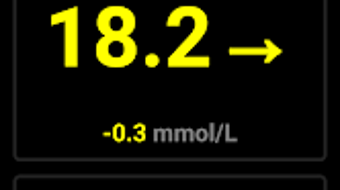
Its primary function is to display glucose data in a clear, accessible format, optimized for low-light environments. The dark user interface, large text, and prominent buttons are specifically designed to reduce eye strain and improve readability in dim conditions. This makes it ideal for users who check their glucose levels during the night without disturbing their sleep or requiring bright screen illumination. While the app does not include advanced analytics or trend predictions, it excels in delivering core data with minimal distraction.
Target users include individuals with diabetes, caregivers, and health-conscious users who utilize Nightscout for continuous glucose monitoring. Real-world usage scenarios include nighttime checks, early morning monitoring, and quick access to glucose trends during routine health management. The app’s simplicity and focus on usability in low-light settings set it apart from more complex health tools.
Key Features & Capabilities
- Dark UI for Nighttime Use – The interface is optimized with a dark color scheme to minimize screen brightness, reducing visual disruption during night checks.
- Large Readings Display – Glucose levels are shown in large, easy-to-read text, ensuring quick comprehension without squinting or zooming.
- Nightscout Integration – The app connects to Nightscout data streams, allowing users to view real-time glucose values directly from their connected devices.
- Simple Navigation – Minimalist design with large, clearly labeled buttons ensures effortless interaction, even when drowsy or in low visibility.
- Free to Use – No in-app purchases or subscription fees are required, making it accessible to a broad range of users.
These features are particularly beneficial for users who need to monitor glucose levels during sleep cycles or early mornings. For example, a diabetic user might use Nightwatch to check their glucose level at 2 a.m. without turning on bright lights, helping maintain sleep quality while ensuring safety. The app’s focus on clarity and ease of use supports consistent monitoring habits, which can contribute to better long-term health outcomes.
User Interface, Workflow & Performance
The user interface of Nightwatch is intentionally minimalistic, prioritizing readability and usability over visual complexity. The layout centers around a large, central display for glucose readings, with navigation elements positioned for easy access with one hand. The dark theme reduces screen glare, making it suitable for use in bedrooms or low-light environments. Buttons are large and clearly labeled, reducing the risk of accidental taps during nighttime use.
Workflow efficiency is high, as the app loads quickly and displays data with minimal delay after connection to Nightscout. The process of accessing glucose levels requires only a single tap to open the app, with no complex setup or login steps. This streamlined experience supports users who may be disoriented or fatigued during nighttime checks.
The developer did not specify resource usage details. Performance observations are based on general software behavior patterns. Stability appears consistent, as the app functions without reported crashes in typical usage scenarios. CPU and RAM usage are expected to be minimal, given the app’s lightweight design and lack of intensive processing tasks.
Compatibility & System Requirements
Nightwatch is designed for Android devices and is compatible with the Android operating system. The app version is 1.1.3, with a file size of 2.3 MB, indicating a lightweight installation that does not consume significant storage space. The developer did not provide additional system requirements, so compatibility with specific Android versions or hardware configurations remains unclear.
Exact system requirements were not listed. Users are advised to ensure their device runs a supported version of Android and has access to the internet for Nightscout integration. Installation is straightforward, requiring only a standard app download from a trusted source. Compatibility information is limited to the OS type and version provided.
Pros and Cons
Pros
- Optimized dark UI for nighttime use
- Large, easy-to-read glucose displays
- Seamless integration with Nightscout data
- Simple and intuitive navigation
- Completely free with no in-app purchases
Cons
- Limited to Android platform
- No advanced analytics or trend visualization
- Exact system requirements not specified
- Relies on external Nightscout data source
- No offline mode or data caching
FAQ Section
Is Nightwatch available for iOS devices?
Nightwatch is currently only available for Android. There is no official iOS version reported.
Does Nightwatch require an internet connection?
Yes, the app requires a stable internet connection to access Nightscout data streams in real time.
Is Nightwatch safe to use for medical monitoring?
While Nightwatch provides a convenient way to view glucose data, it is not a medical device. Users should consult healthcare professionals for medical advice.
How often does the app update glucose levels?
The update frequency depends on the Nightscout data source. The app displays data as it becomes available from the connected system.
Can I use Nightwatch without a Nightscout account?
No, the app requires a valid Nightscout data feed to function. It does not support standalone glucose entry or manual input.
Final Thoughts
Nightwatch delivers a focused, reliable solution for individuals who need to monitor their glucose levels during nighttime hours. Its minimalist design, dark interface, and emphasis on readability make it a practical tool for users managing diabetes or tracking blood sugar trends. While it lacks advanced features like trend graphs or offline access, its core functionality is executed with precision and care.
For users already using Nightscout, Nightwatch offers a streamlined, low-distraction way to check glucose levels without disrupting sleep. The free price point and lightweight nature further enhance its appeal. Although it is limited to Android and depends on external data sources, its strengths in usability and simplicity outweigh these constraints for its target audience.
Download Nightwatch now






.png)
